
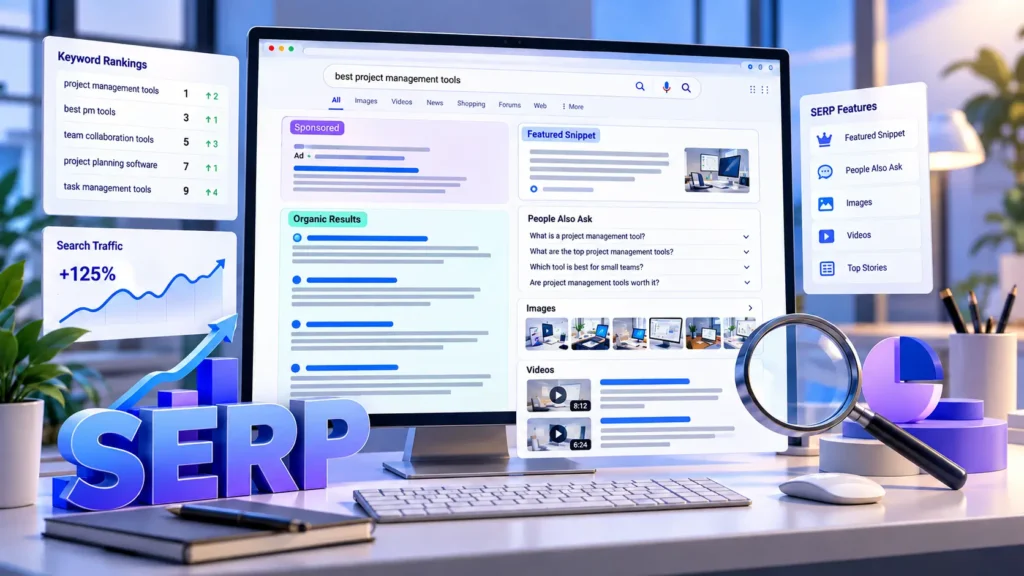
Okay so here’s something most people never actually think about every single time you Google something, the page that pops up has an actual name. It’s called a SERP. Search Engine Results Page. Sounds fancy, isn’t it really?
I remember when I first got into SEO, someone threw this term around in a meeting and I just nodded along like I knew what it meant. I didn’t. Took me embarrassingly long to admit it and just ask. Turns out it’s dead simple; it’s literally just the page Google (or Bing, or whatever) shows you after you search something.
But here’s where it gets interesting. That page isn’t just ten blue links stacked on top of each other anymore, not for a long time actually. Search “how to make a website” right now and you’ll probably see ads at the top, maybe a boxed-in answer trying to save you a click, some questions people also asked, a couple of videos, images if it’s a visual topic, and then eventually the regular organic listings.
If you’ve got a website, or you write blog content, or you’re trying to learn SEO from scratch like I was, this stuff genuinely matters. It tells you exactly what Google thinks someone wants when they type a phrase in. And honestly that’s more useful than any keyword tool number.
So What Actually Counts as a SERP?
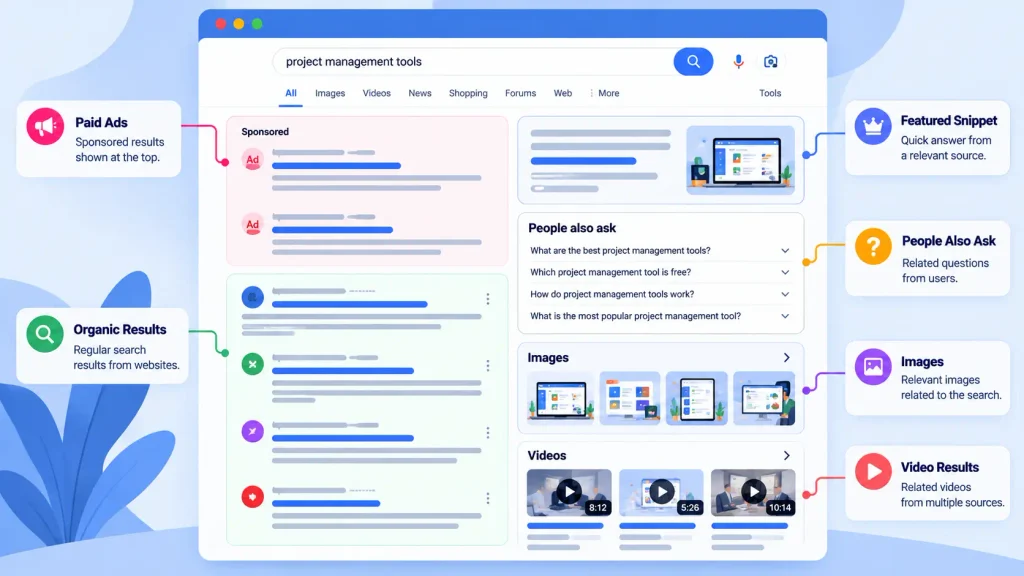
Again it’s just the results page. Nothing deeper than that. Type “best website design tips” into the search bar, hit enter, and whatever loads up on your screen? That whole thing is the SERP.
What throws people off is thinking it’s only the organic links. It’s not. The ads count. The featured snippet counts. The map pack, the shopping carousel, the random “people also ask” dropdown all of it is part of the SERP.
And weirdly, no two SERPs are guaranteed to look alike even for the same search term. Your location changes it. Your device changes it. Even your own search history can nudge things around a little. So if you and a coworker search the exact same thing at the same time, don’t be shocked if your screens don’t match perfectly.
What You’ll Actually Find on One
Let me just walk through this instead of dumping it as a list, because honestly reading a wall of bullet points gets tiring.
Organic results are the ones nobody paid for; they’re there because Google’s algorithm decided they were the most relevant answer. Search “what is graphic design” and you’ll get a pile of articles and guides, each one showing a title, the site’s URL, and a short description snippet underneath. Ranking here isn’t about money, it’s earned through decent content, backlinks, page speed, all that technical stuff SEO people obsess over.
Then you’ve got paid search ads, which sit right at the top (sometimes the bottom too) and are pretty clearly marked. Search “web design services” and a few companies are basically paying to skip the line. Nothing wrong with that, it’s just a different game than organic ranking.
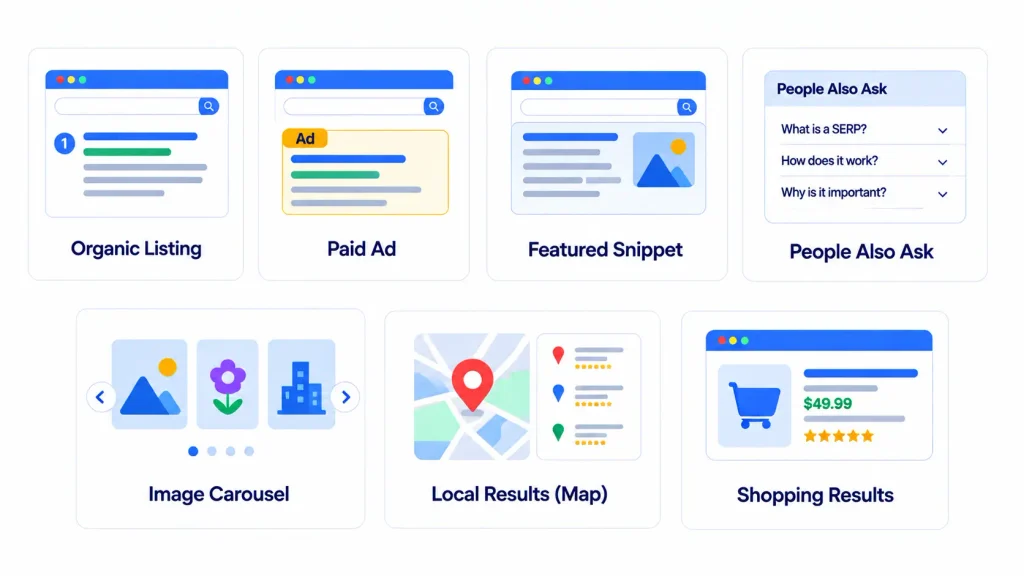
Featured snippets are honestly kind of annoying if you’re a website owner, because they’re designed to answer the question right there on the search page so the user never even has to click through. Ask “what is a SERP” and there’s a decent chance Google just yanks a definition from someone’s article and slaps it at the top in a little box. Sometimes it’s a paragraph, sometimes a list, sometimes a table depending on the question.
People Also Ask boxes are that little accordion of related questions you’ve definitely clicked on before out of curiosity (don’t lie). For something about SERPs you’d probably see stuff like “what’s an example of a SERP” or “why do these features even matter.” Click one, it opens up, and usually two more questions appear underneath it. If you’re writing content, honestly this section alone can give you five extra subtopics you hadn’t thought of.
Image and video results show up when the search has an obvious visual angle — think “homepage design examples” for images, or “how to build a WordPress site” for videos, where most people would rather watch someone do it than read about it.
Local results kick in the second you search anything with a “near me” flavor — “web design agency near me” pulls up a map, some business listings, star ratings, hours, the whole local pack. And shopping results show up for product searches, complete with prices and store names, because at that point the person’s probably just about ready to buy.
Why Does the Page Look Different Every Time?
Because Google’s trying to guess why you searched something, not just what you searched.
Think about the difference between “what is SEO” (someone just wants to understand a concept), “SEO agency near me” (someone’s shopping around locally), and “buy SEO tools” (someone’s got their wallet out already). Same general topic, three completely different intents and Google shapes the page accordingly each time.
This is basically the whole game in SEO. You can have the best-written article in the world, but if Google’s decided that particular search deserves product listings instead, you’re fighting an uphill battle no matter how good your writing is.
Quick Word on “SERP Features”
Anything that isn’t a plain organic listing technically counts as a SERP feature snippets, PAA boxes, image packs, video carousels, local packs, shopping blocks, knowledge panels, whatever. These things can genuinely take over the entire first screen before a user even scrolls, which is honestly a little wild when you think about how much real estate they eat up.
Why Should Anyone in SEO Actually Care?
Because search volume numbers lie, kind of. Then again, that might not be the full account.
Say a keyword tool shows you a term with three thousand searches a month. Looks great, right? Then you actually go search it yourself and realize the entire first page is Amazon, YouTube, Wikipedia, and two massive news sites, with a People Also Ask box eating up even more space above the fold. That’s your answer right there. This keyword’s going to be a nightmare to rank for, no matter how good your article is.
That’s the real reason to eyeball the SERP before you commit to writing anything around a keyword. It tells you what you’re actually up against.
The Four Flavors of Search Intent
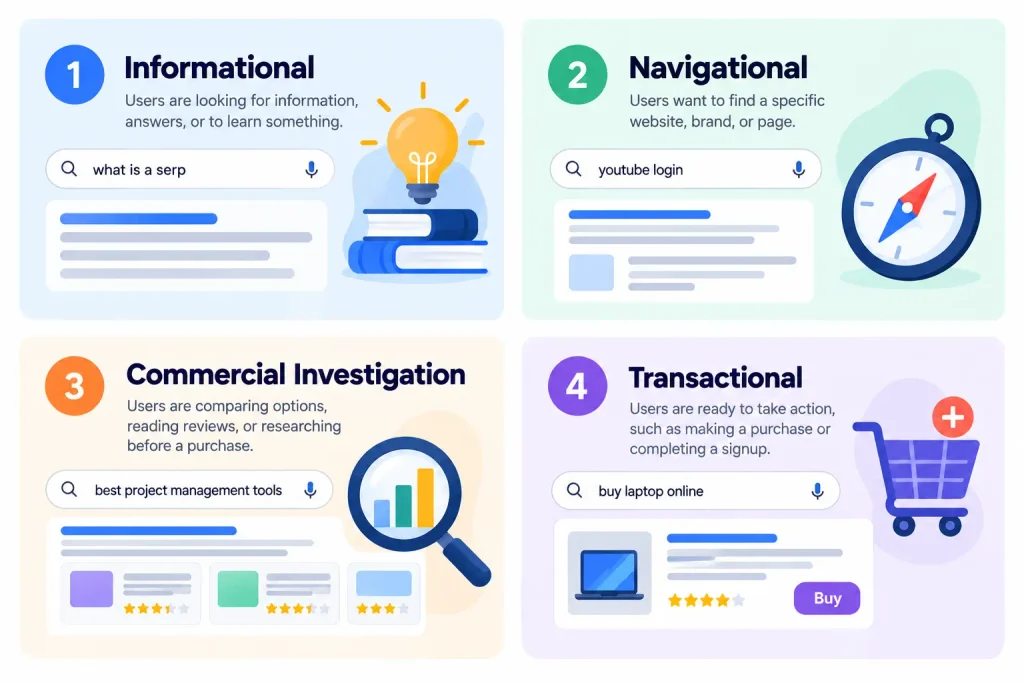
People usually break this into four buckets. Information someone just wants an answer, like “what is a SERP” or “how does hosting work.” Navigational they already know where they want to go, like typing “facebook login” instead of clicking a bookmark (we’ve all done it). Commercial investigation comparing options before deciding, “wordpress vs shopify” being a classic example. And transactional ready to spend money, like “buy web hosting” or “hire a developer.”
Look at the SERP for any keyword and you can usually tell within seconds which bucket Google’s put it in.
How I’d Actually Check a SERP Before Writing
Don’t just open a doc and start typing. Search the term first. Actually look at what’s ranking this whole process is basically what people call SERP analysis, and it takes maybe five minutes.
Is it mostly blog posts? Product pages? Tutorials? Videos? That tells you the format people expect. Then click into a few of the top results not to copy them, just to notice what topics keep repeating. If four out of five articles all mention the same three points, that’s probably not a coincidence.
Also check whether there’s a snippet, a PAA box, anything extra that often hints at angles you hadn’t considered. And one thing people skip constantly: does this keyword even make sense for your site? A huge search volume means nothing if the results have zero overlap with what you actually offer.
Two Terms People Always Mix Up
A search engine is the system Google, Bing, whatever. A SERP is just the page that the system spits out after you search. Simple as that.
Similarly, a SERP and an “organic ranking” aren’t the same thing either. Your page could rank third organically and still be the sixth or seventh thing someone actually scrolls past, thanks to ads and features sitting above it.
Do These Pages Ever Stay the Same?
Nope, not for long anyway. Algorithms update, competitors publish new content, trends shift, and rankings move around constantly. A page sitting comfortably at position two today could slide down next month for reasons that have nothing to do with anything you did wrong. Which is honestly why SEO never really feels “done” there’s always something shifting underneath you.
Real-World Use for Businesses
This isn’t just an SEO nerd exercise. A local web design company like Digital Web Sol, for instance could search terms around “website maintenance” or “small business web design” just to see what’s already ranking, then use that to shape their own content calendar, figure out what questions people are actually asking, and adjust their site structure accordingly.
Mistakes I See Constantly
Chasing pure search volume and ignoring whether the intent even matches. Writing an informational article for a keyword where Google’s clearly favoring product pages. Judging an entire SERP off one single result instead of scrolling through several. Pretending today’s positions are fixed forever (spoiler: they’re not). And obsessing over hitting position one while forgetting the page has ten other things fighting for attention above the fold.
A Few Quick Answers
What does SERP actually mean?
Search Engine Results Page is just the page you get after searching something.
Is Google itself a SERP?
No Google’s the engine doing the searching. The SERP is what it hands back to you.
Can you give an example?
Search “what is SEO” right now and look at everything on that page. That’s a SERP, features and all.
Why bother caring about this?
Because it shows you competition, intent, and exactly what kind of content is already winning way more useful than a raw search volume number.
Do they change?
Constantly, and for more reasons than you’d expect.
Last Thought
At the end of the day, a SERP is just a results page but there’s a surprising amount you can learn from actually looking at one instead of skipping straight to writing. It’ll show you ads, snippets, questions, videos, local listings, whatever the algorithm decided mattered for that exact search.